**Category:** VoIP
**Difficulty:** Intermediate
---
## What You'll Learn
Once a SIP device has successfully registered with a SIP server, it is ready to make and receive calls. But what actually happens after a user dials a number?
Behind every VoIP call, a sequence of SIP messages is exchanged between devices and servers to establish, manage, and terminate the communication session. These messages ensure that both parties can locate each other, negotiate media parameters, and begin exchanging voice packets.
Understanding SIP call flow is one of the most important skills for VoIP engineers because nearly every call-related problem can be diagnosed by analyzing SIP signaling.
In this article, you'll learn how SIP establishes a call, the purpose of common SIP messages such as `INVITE`, `100 TRYING`, `180 RINGING`, `200 OK`, `ACK`, and `BYE`, how SDP negotiates media, and how to troubleshoot common call setup issues.
---
## Learning Objectives
After reading this article, you will be able to:
- Understand the complete SIP call establishment process.
- Explain the purpose of each SIP message exchanged during a call.
- Understand how SDP negotiates media capabilities.
- Describe how SIP terminates a call.
- Troubleshoot common SIP call setup issues.
---
## In This Article
- Overview of SIP Call Flow
- SIP User Agents and Servers
- Step-by-Step SIP Call Establishment
- Understanding SIP Messages
- SDP Negotiation Explained
- RTP Media Begins
- SIP Call Termination
- Common SIP Response Codes
- Troubleshooting Corner
- Best Practices
- Engineer's Tip
- Frequently Asked Questions
---
## What Is SIP Call Flow?
A SIP call flow is the sequence of signaling messages exchanged between SIP endpoints and servers during the lifetime of a call.
Unlike RTP, which carries voice, SIP is responsible for:
- Locating users
- Initiating calls
- Negotiating media
- Managing sessions
- Ending calls
Think of SIP as a conversation coordinator. Before two people can talk, SIP ensures both devices are ready, agree on how they will communicate, and know where to send media.
---
## SIP Components Involved
A typical SIP call involves several entities.
| Component | Role |
|---|---|
| Caller (User Agent Client) | Initiates the call |
| SIP Proxy / IP PBX | Routes SIP messages |
| Registrar | Maintains registration database |
| Callee (User Agent Server) | Receives the call |
| RTP | Carries voice after call setup |
---
## SIP Call Flow Overview
The following simplified diagram illustrates a successful SIP call.
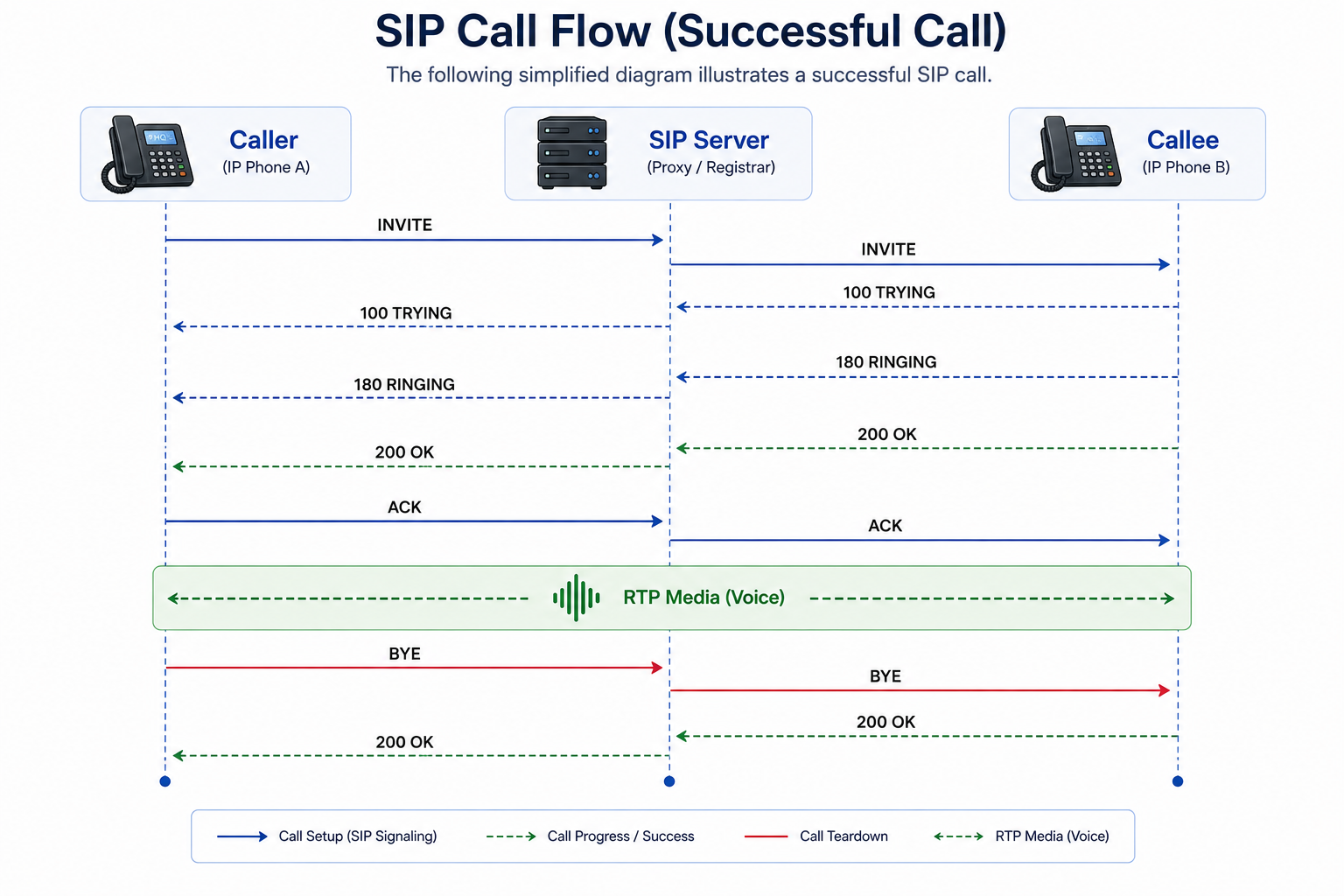
This sequence represents the standard SIP call lifecycle.
---
## Step 1 – INVITE
The call begins when the caller dials a destination number.
The IP phone sends an `INVITE` request to the SIP server.
The `INVITE` message contains:
- Caller information
- Destination address
- Supported codecs
- SDP media information
- Contact details
Example:
```text
INVITE sip:1002@company.com SIP/2.0
```
The SIP server examines the destination and determines where the call should be routed.
---
## Step 2 – 100 TRYING
The SIP server immediately replies:
```text
SIP/2.0 100 Trying
```
### What does it mean?
It tells the caller:
> "I received your request and I'm processing it."
This response prevents the caller from retransmitting the `INVITE` unnecessarily.
---
## Step 3 – 180 RINGING
After locating the destination device, the SIP server forwards the `INVITE`.
If the destination phone is available, it begins ringing and replies:
```text
SIP/2.0 180 Ringing
```
At this point:
- The caller hears a ringback tone.
- The callee's phone is ringing.
- The call has not been answered yet.
---
## Step 4 – 200 OK
When the recipient answers the phone, the device returns:
```text
SIP/2.0 200 OK
```
This response confirms:
- The call is accepted.
- Codec negotiation succeeded.
- RTP ports are ready.
- SDP parameters are finalized.
---
## Step 5 – ACK
Although the call has been accepted, SIP requires one final confirmation.
The caller sends:
```text
ACK
```
This acknowledges receipt of the `200 OK` response.
Only after the `ACK` is received does the SIP signaling phase complete.
---
## SDP Negotiation Explained
During the `INVITE` and `200 OK` messages, SIP carries Session Description Protocol (SDP) information.
SDP defines how media will be exchanged.
Typical SDP information includes:
- Audio codecs
- RTP port numbers
- Media type
- IP address
- Packetization interval
Example:
```text
m=audio 10020 RTP/AVP 0 8 18
```
This tells the receiving endpoint:
- Which RTP port to use
- Which codecs are supported
- What media type is available
Both devices must agree on a common codec before RTP begins.
---
## RTP Media Begins
Once `ACK` has been exchanged:
- SIP signaling is complete.
- RTP takes over.
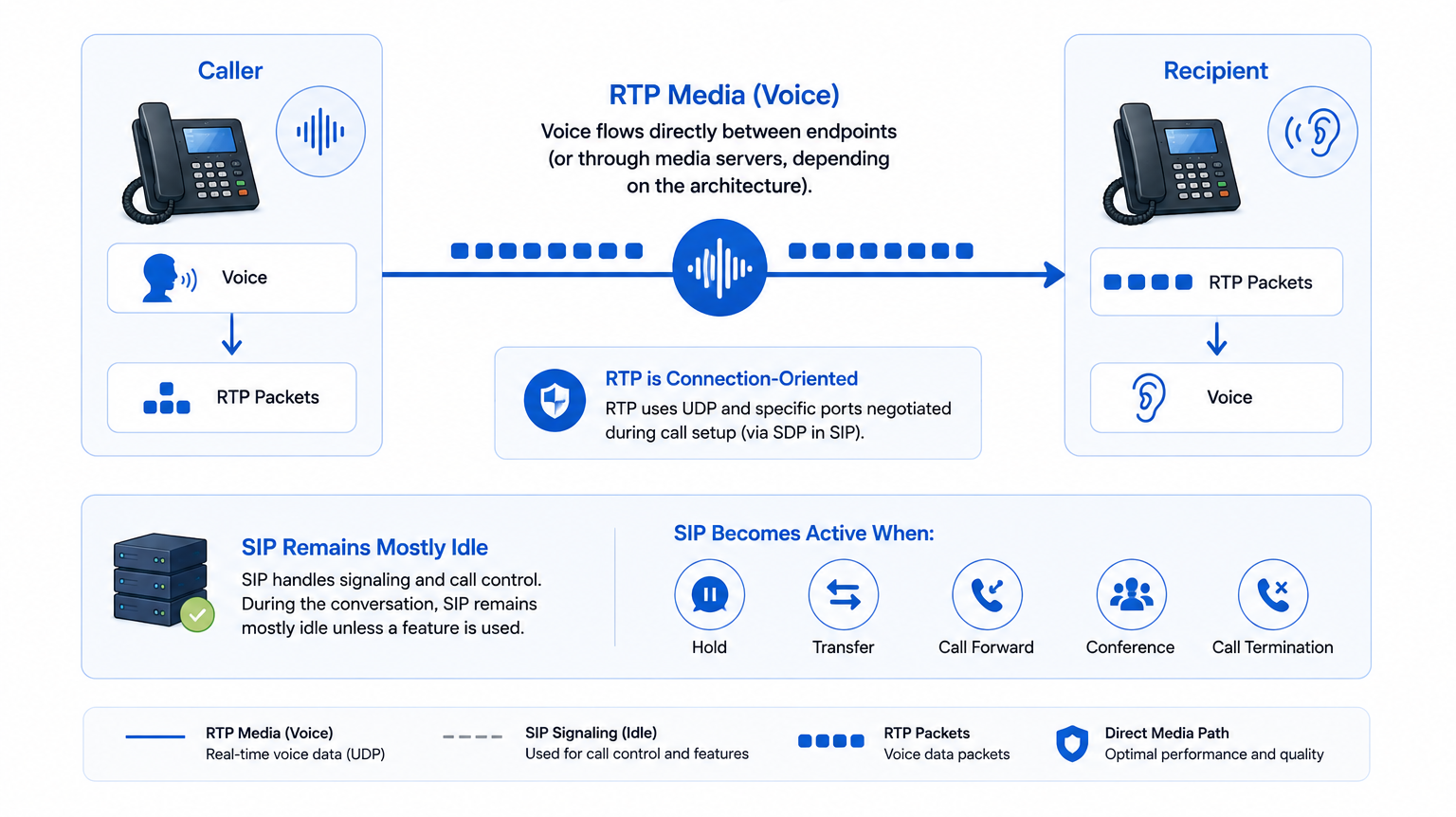
Voice now flows directly between the endpoints (or through media servers, depending on the architecture).
SIP remains mostly idle unless a feature such as hold, transfer, or call termination occurs.
---
## SIP Call Termination
When either party hangs up, a `BYE` request is sent.
```text
BYE sip:1002@company.com SIP/2.0
```
The receiving endpoint replies:
```text
200 OK
```
The call is now terminated.
The RTP media stream also stops immediately.
---
## Complete SIP Message Sequence
| SIP Message | Purpose |
|---|---|
| `INVITE` | Start a call |
| `100 TRYING` | Request received |
| `180 RINGING` | Destination ringing |
| `183 Session Progress` | Early media (optional) |
| `200 OK` | Call accepted |
| `ACK` | Confirm session establishment |
| `BYE` | End call |
| `CANCEL` | Cancel before answer |
| `OPTIONS` | Capability check |
| `INFO` | Mid-call signaling |
Understanding these messages is essential for reading SIP traces and troubleshooting call failures.
---
## Common SIP Response Codes
| Code | Meaning |
|---:|---|
| `100` | Trying |
| `180` | Ringing |
| `183` | Session Progress |
| `200` | Success |
| `302` | Redirect |
| `401` | Authentication Required |
| `403` | Forbidden |
| `404` | User Not Found |
| `408` | Request Timeout |
| `480` | Temporarily Unavailable |
| `486` | Busy Here |
| `487` | Request Terminated |
| `500` | Internal Server Error |
| `503` | Service Unavailable |
---
## Troubleshooting Corner
### Scenario 1 – Phone Rings but No Audio
#### Symptoms
- Both users answer the call.
- Call timer starts.
- No one can hear each other.
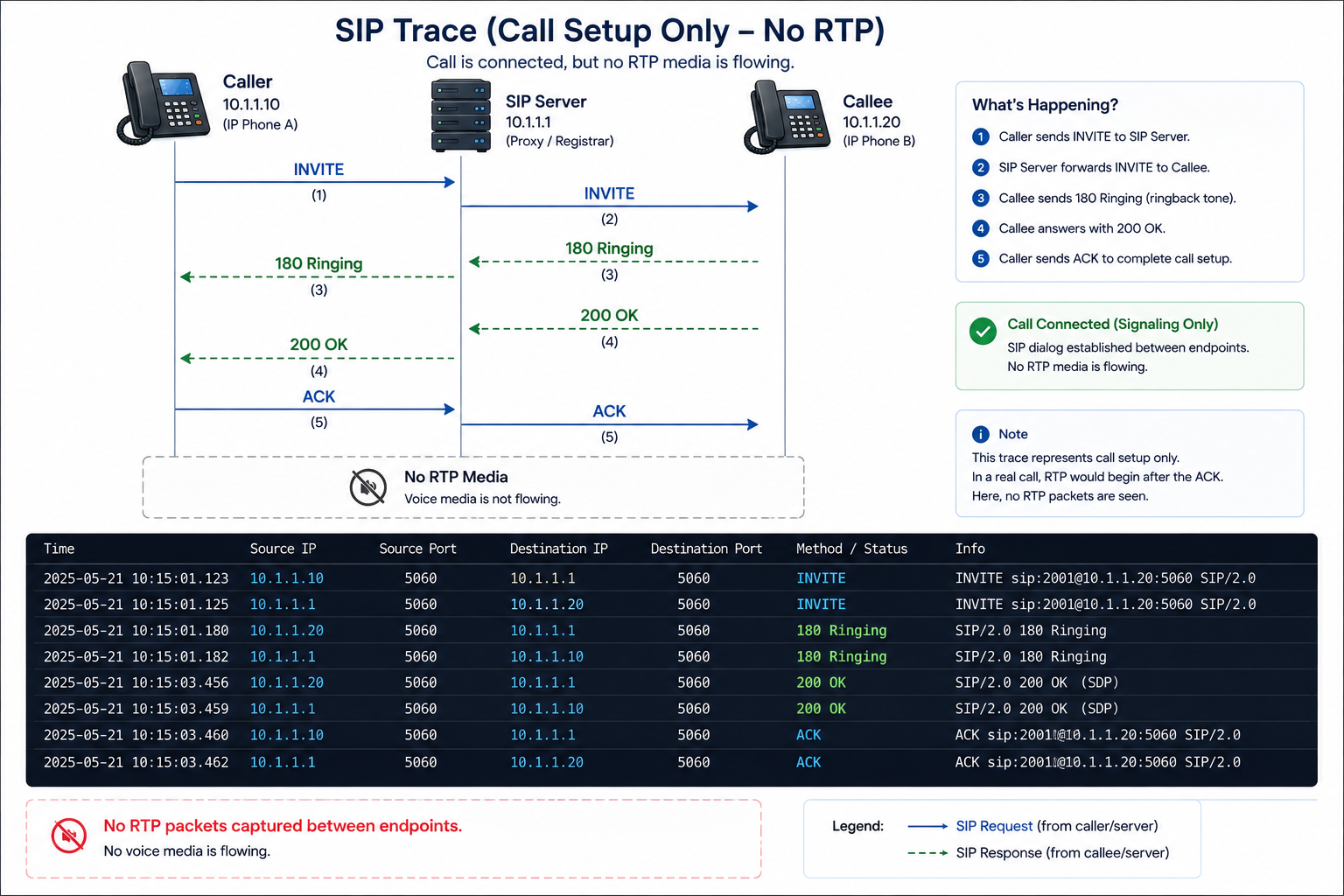
#### Possible Causes
- Firewall blocking RTP
- Incorrect RTP port range
- NAT traversal issue
- SBC configuration error
#### Resolution
- Verify RTP ports.
- Check firewall rules.
- Confirm NAT traversal.
- Capture RTP traffic using Wireshark.
---
### Scenario 2 – Caller Hears Ringback Forever
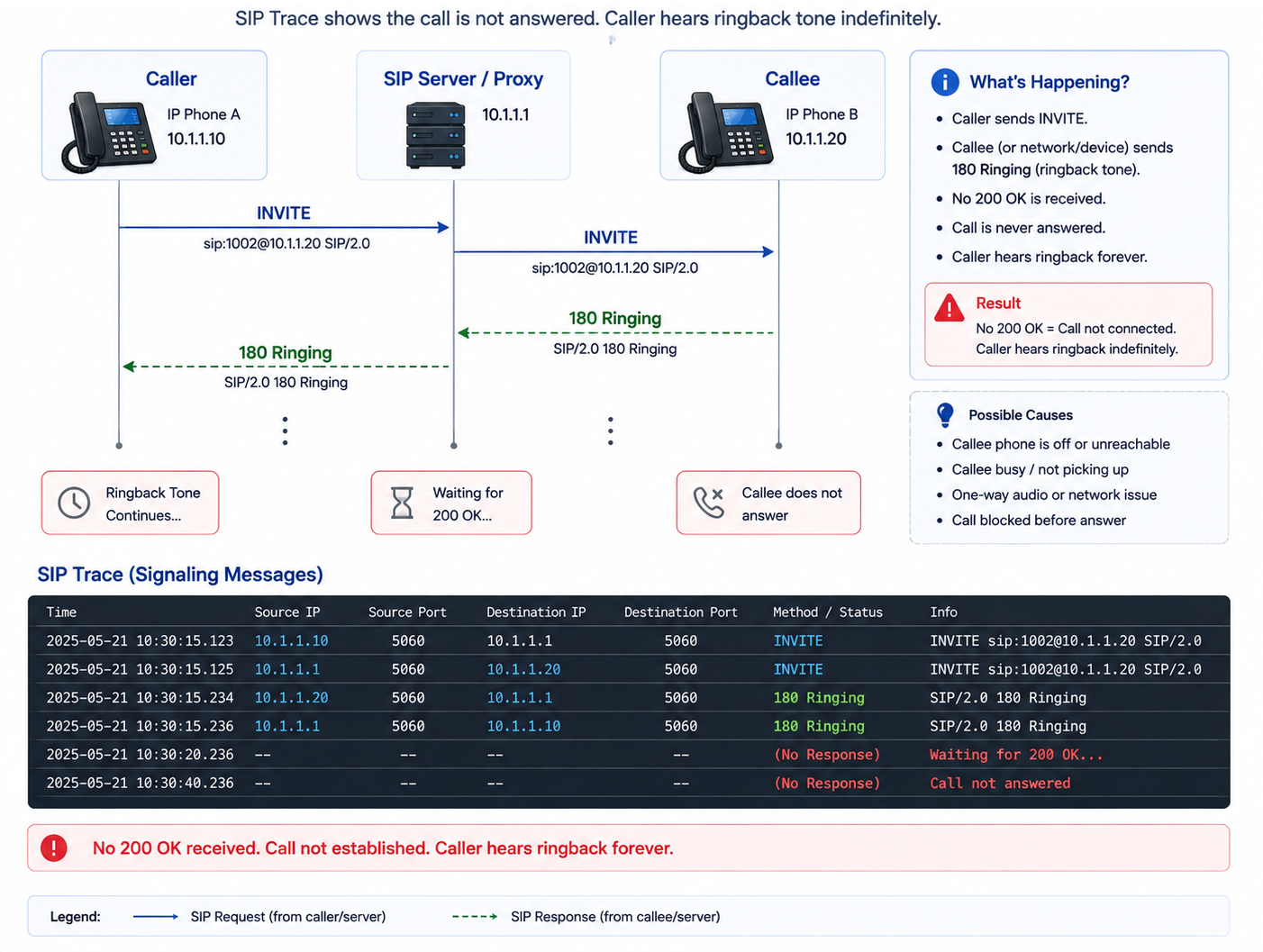
#### Possible Causes
- Callee never answered.
- PBX routing issue.
- Device offline.
- SIP timeout.
#### Resolution
- Verify destination registration.
- Check call routing.
- Review PBX logs.
- Confirm endpoint status.
---
### Scenario 3 – 404 User Not Found
#### SIP Trace
```text
INVITE sip:1005@company.com
SIP/2.0 404 Not Found
```
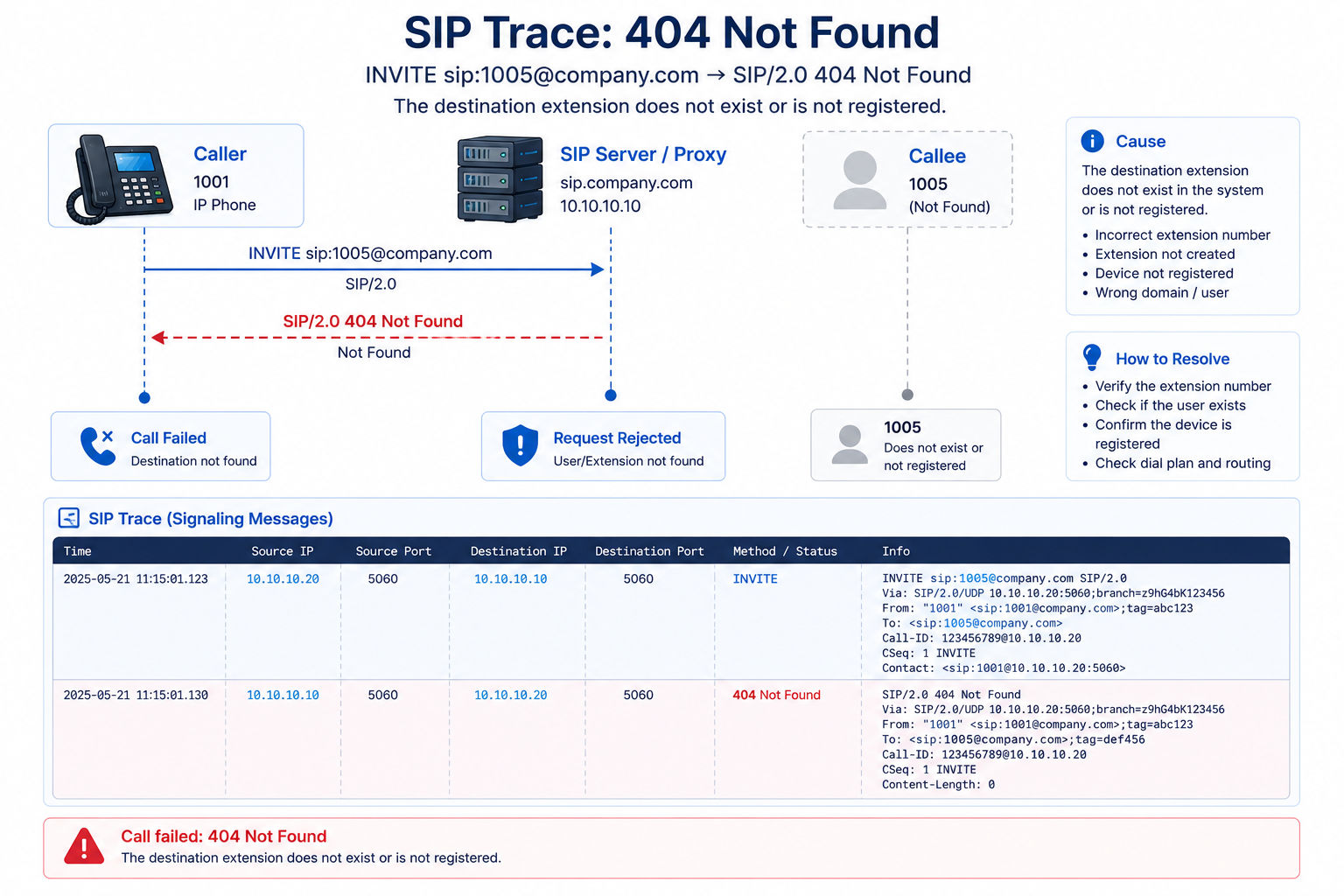
**Cause**
The destination extension does not exist or is not registered.
**Resolution**
- Verify the extension number.
- Confirm user registration.
- Check dial plan configuration.
---
### Scenario 4 – Busy Here
```text
486 Busy Here
```
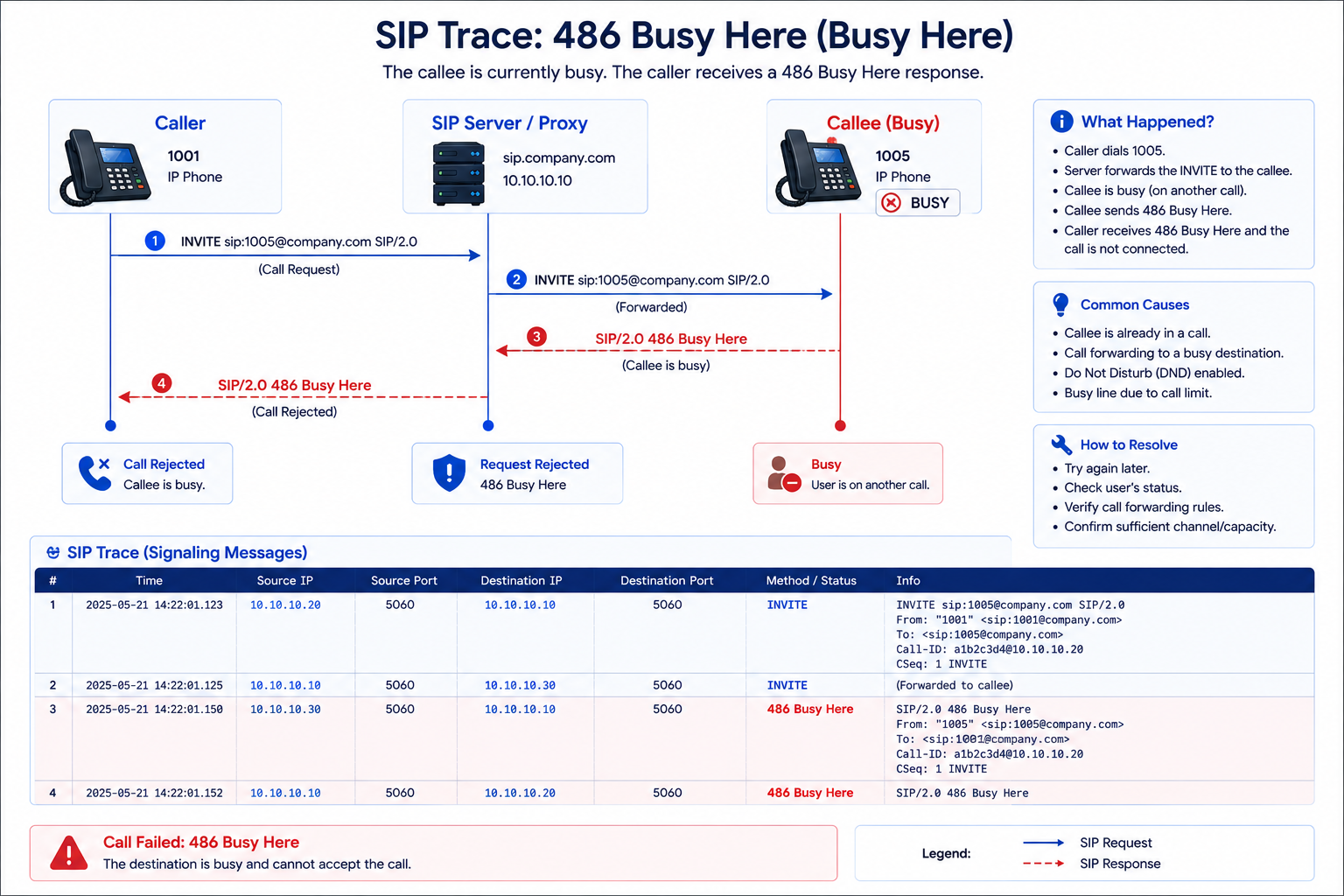
The destination user is already engaged on another call or has rejected the incoming call.
---
### Scenario 5 – One-Way Audio
#### Symptoms
- Caller hears callee.
- Callee cannot hear caller.
#### Common Causes
- NAT misconfiguration
- Incorrect SDP address
- Firewall blocking RTP
- Asymmetric routing
#### Resolution
- Inspect SDP media addresses.
- Verify public IP configuration.
- Confirm RTP packet flow using packet captures.
---
## Best Practices
To ensure reliable SIP call establishment:
- Use SIP over TLS where possible.
- Synchronize system clocks using NTP.
- Configure QoS to prioritize SIP and RTP traffic.
- Disable unnecessary SIP ALG features on firewalls unless required and validated.
- Monitor SIP response codes for abnormal patterns.
- Maintain accurate DNS and NTP configurations.
- Test failover scenarios regularly in high-availability deployments.
---
## Engineer's Tip
A successful SIP call does not always mean successful media.
One of the most common mistakes among new VoIP engineers is focusing only on SIP signaling. Seeing `200 OK` and `ACK` confirms that the signaling phase completed successfully, but it does not guarantee that RTP media is flowing correctly.
When users report "The call connects, but there's no audio" or "I can hear them, but they can't hear me," the SIP call flow is usually functioning as expected. The issue often lies with RTP, NAT traversal, firewall rules, or codec negotiation.
A useful troubleshooting approach is:
1. Verify SIP signaling is complete (`INVITE → 200 OK → ACK`).
2. Check that RTP packets are being sent and received.
3. Inspect the SDP for correct IP addresses and ports.
4. Confirm firewall and NAT policies allow RTP traffic.
This method helps isolate signaling problems from media problems and speeds up troubleshooting.
---
## Key Takeaways
- SIP manages the signaling process for VoIP calls.
- A typical successful call follows the sequence: `INVITE → 100 TRYING → 180 RINGING → 200 OK → ACK → RTP → BYE`.
- SDP negotiates codecs and RTP ports during call setup.
- RTP carries the actual voice after signaling is complete.
- Many call failures can be diagnosed by analyzing SIP messages and response codes before investigating media flow.
---
## Frequently Asked Questions
### 1. Does SIP carry voice packets?
No. SIP is responsible for signaling only. Voice packets are transmitted using RTP.
### 2. What happens if the ACK message is never received?
The call is not fully established. The receiving endpoint may retransmit the `200 OK` until a timeout occurs, after which the session is typically terminated.
### 3. What is the difference between 180 Ringing and 183 Session Progress?
`180 Ringing` indicates that the destination device is alerting the user. `183 Session Progress` is often used to establish early media, allowing announcements or ringback tones generated by the network before the call is answered.
### 4. Can I analyze SIP call flow using Wireshark?
Yes. Wireshark is one of the most widely used tools for analyzing SIP signaling and RTP media. It allows engineers to inspect SIP messages, response codes, SDP content, and RTP streams.
### 5. Why is understanding SIP call flow important?
A clear understanding of SIP call flow enables engineers to troubleshoot failed calls, identify routing issues, diagnose signaling problems, and distinguish between signaling failures and media-related issues.
---
## Continue Learning
Now that you understand how SIP signaling establishes and terminates a call, the next step is to learn how voice quality is affected by codecs and why codec selection impacts bandwidth, latency, and interoperability.
**Next Article:** *[Common VoIP Codecs Explained](#)*
In the next article, you'll learn:
- What an audio codec is
- How codecs compress voice
- G.711, G.729, G.722, Opus, and other popular codecs
- Codec negotiation using SDP
- Choosing the right codec for different network environments
- Codec-related troubleshooting and optimization
---
## References
- [IETF RFC 3261 – SIP: Session Initiation Protocol](https://www.rfc-editor.org/rfc/rfc3261)
- [IETF RFC 3264 – An Offer/Answer Model with SDP](https://www.rfc-editor.org/rfc/rfc3264)
- [IETF RFC 4566 – Session Description Protocol (SDP)](https://www.rfc-editor.org/rfc/rfc4566)
- [Wireshark Official Documentation](https://www.wireshark.org/docs/)
Article 5: Understanding SIP Call Flow
Understand how SIP call flow works from call initiation to termination. Learn how INVITE, 100 TRYING, 180 RINGING, 200 OK, ACK, SDP, RTP, and BYE work together to establish, manage, and end a VoIP call, along with practical troubleshooting techniques for common SIP call issues.