
**Category:** VoIP
**Difficulty:** Beginner → Intermediate
## What You'll Learn
Before an IP phone can make or receive calls, it must first identify itself to a SIP server. This process is known as **SIP Registration**. Registration allows the SIP server (Registrar) to know where each user is currently located so incoming calls can be routed correctly.
To prevent unauthorized devices from registering as legitimate users, SIP also uses an authentication mechanism called **Digest Authentication**. Together, registration and authentication form the foundation of secure SIP communications.
In this article, you'll learn how SIP devices register with a SIP server, how digest authentication works, what happens when registration expires, and how to troubleshoot common registration problems.
## Learning Objectives
After reading this article, you will be able to:
- Understand the purpose of SIP registration.
- Explain how SIP authentication works.
- Interpret SIP REGISTER message exchanges.
- Understand registration expiry and re-registration.
- Troubleshoot common SIP registration failures.
## In This Article
- What is SIP Registration?
- Why is Registration Required?
- SIP Registration Components
- SIP REGISTER Call Flow
- Understanding SIP Digest Authentication
- Registration Expiry
- Common SIP Response Codes
- Troubleshooting Registration Issues
- Best Practices
- Frequently Asked Questions
---
## What Is SIP Registration?
SIP Registration is the process where a SIP endpoint (such as an IP phone or softphone) informs a SIP server of its current network location.
When registration succeeds, the SIP server stores information such as:
- Username (SIP Extension)
- Contact Address
- IP Address
- Port Number
- Registration Expiry Time
- Transport Protocol (UDP, TCP, TLS)
Without registration, the SIP server has no knowledge of where to deliver incoming calls.
Think of registration as updating your current address with a postal service. Unless the postal service knows where you are, it cannot deliver your mail. Similarly, unless a SIP server knows where a device is connected, it cannot route incoming calls.
## Why Is Registration Required?
Registration serves several important purposes.
### 1. Device Discovery
- The SIP server maintains a dynamic list of active devices and their current locations.
### 2. Call Routing
- When another user dials your extension, the server consults its registration database to determine where your device is currently connected.
### 3. Authentication
- Registration ensures only authorized devices can use the VoIP service.
### 4. Mobility
- Because devices register dynamically, users can move between offices or work remotely while keeping the same extension.
---
## SIP Registration Components
Several SIP entities participate during registration.
| **Component** | **Function** |
| --- | --- |
| SIP User Agent (UA) | IP Phone or Softphone |
| SIP Registrar | Receives registration requests |
| SIP Proxy | Routes SIP requests |
| Location Server | Stores registration database |
| Authentication Server | Validates user credentials |
Many IP PBX platforms combine these functions into a single server.
---
## The SIP REGISTER Process
When an IP phone starts, it sends a REGISTER request to the SIP Registrar.
A simplified registration sequence looks like this:
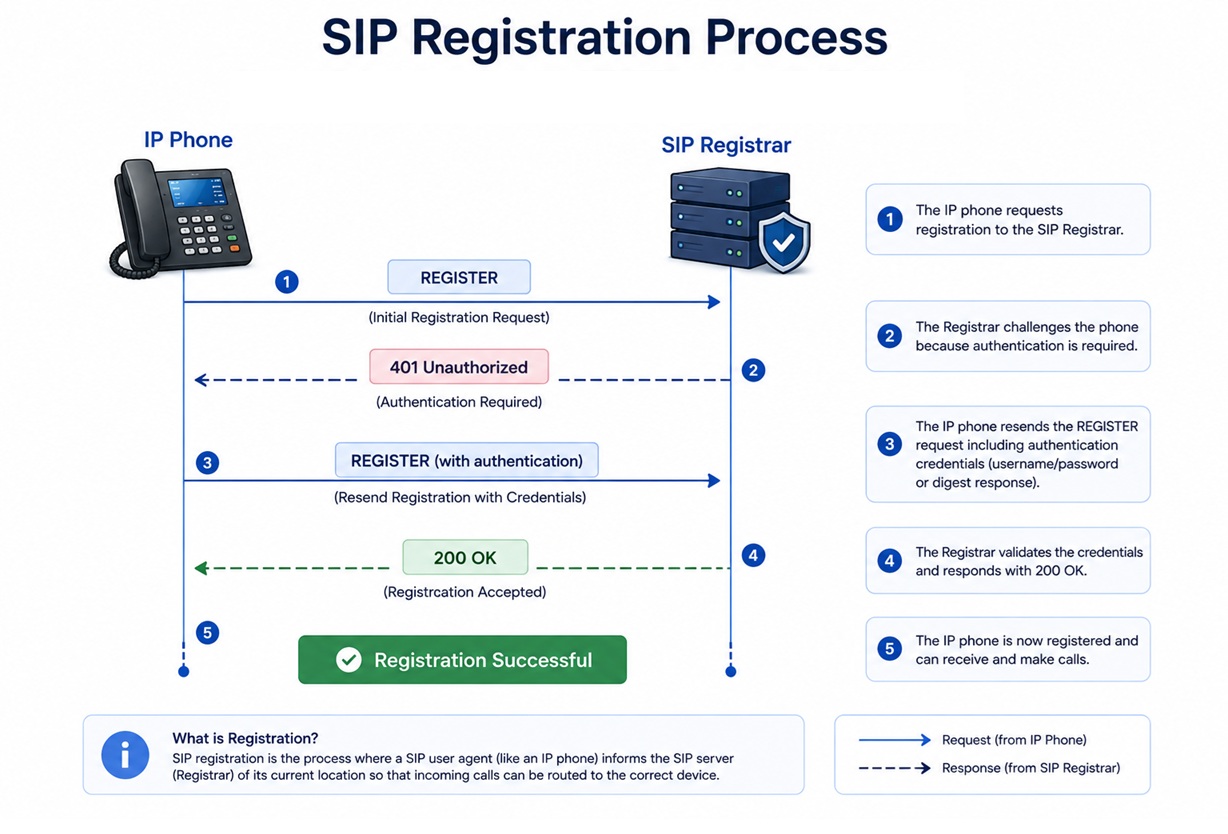
Notice that the server initially rejects the registration request.
This is expected behavior.
The first REGISTER request usually does **not** contain authentication credentials. The server responds with **401 Unauthorized**, challenging the device to prove its identity.
## Step-by-Step SIP Registration
### Step 1 – Device Boots
The IP phone receives:
- IP Address
- DNS Server
- Default Gateway
- SIP Server Address
This information is commonly provided by DHCP.
### Step 2 – REGISTER Request
The phone sends:
`REGISTER sip:company.com SIP/2.0`
At this stage, no authentication information is included.
### Step 3 – Server Challenge
The server replies:
`401 Unauthorized`
This is not an error.
Instead, it tells the phone:
*"Please prove who you are."*
The response contains:
- Nonce
- Realm
- Authentication Algorithm
These values are required for Digest Authentication.
### Step 4 – Digest Authentication
The phone calculates a cryptographic hash using:
- Username
- Password
- Realm
- Nonce
- SIP Method
The password itself is **never transmitted** across the network.
Instead, only the calculated hash is sent.
This greatly improves security compared with transmitting passwords in plain text.
### Step 5 – Registration Success
If the calculated hash matches the server's expected value, registration succeeds.
The server responds:
`200 OK`
The device is now available to receive incoming calls.
---
## Understanding SIP Digest Authentication
Digest Authentication is defined in RFC 3261 and is based on an MD5 challenge-response mechanism.
Its goal is to verify a user's identity without exposing the actual password.
The authentication process follows this sequence:
- Client requests registration.
- Server issues a challenge (401 Unauthorized).
- Client calculates a digest response.
- Server verifies the response.
- Registration succeeds.
Because only the hash is exchanged, an attacker capturing SIP packets cannot directly recover the password.
---
## Registration Expiry
SIP registrations are temporary.
Each registration includes an expiration timer.
For example:
`Expires: 3600`
This means the registration remains valid for **3600 seconds (1 hour)**.
Before the timer expires, the IP phone automatically sends another REGISTER request to refresh its registration.
This process is known as **Re-registration**.
## Why Registrations Expire
Registration expiry provides several benefits:
- Removes inactive devices
- Updates changing IP addresses
- Supports user mobility
- Prevents stale routing information
Without expiration timers, disconnected devices might remain registered indefinitely.
---
## SIP Response Codes During Registration
Several SIP response codes may appear during registration.
| Response Code | Meaning |
| --- | --- |
| 200 OK | Registration successful |
| 401 Unauthorized | Authentication challenge |
| 403 Forbidden | Authentication failed |
| 404 Not Found | User does not exist |
| 408 Request Timeout | No server response |
| 423 Interval Too Brief | Registration interval too short |
| 500 Server Internal Error | Server issue |
| 503 Service Unavailable | Service temporarily unavailable |
Understanding these response codes helps administrators quickly identify registration problems.
---
## Common Registration Problems
### 1. Incorrect Username
The SIP username configured on the phone does not match the extension configured on the server.
Typical symptoms include:
- 403 Forbidden
- Registration failed
### 2. Incorrect Password
The authentication password is incorrect.
This results in repeated authentication failures.
### 3. Wrong SIP Server Address
The phone attempts to register with an incorrect server or domain.
Verify:
- SIP Domain
- Registrar Address
- Proxy Address
### 4. Firewall Blocking SIP
Firewalls may block SIP traffic.
Common ports include:
| Protocol | Port |
| --- | --- |
| SIP UDP | 5060 |
| SIP TCP | 5060 |
| SIP TLS | 5061 |
### 5. NAT Issues
If the device is behind NAT, the server may receive private IP addresses that are not reachable.
Solutions include:
- STUN
- TURN
- ICE
- SBC
- NAT Keepalive
### 6. DNS Problems
Incorrect DNS configuration prevents the phone from resolving the SIP server hostname.
Always verify DNS resolution.
### 7. Registration Interval Too Short
Some devices request very frequent registrations.
The server responds:
`423 Interval Too Brief`
Increase the registration interval according to server requirements.
---
## Troubleshooting SIP Registration
When registration fails, administrators should follow a structured troubleshooting process.
### Step 1 – Verify Network Connectivity
Check:
- IP Address
- Gateway
- DNS
- Internet access
### Step 2 – Verify SIP Credentials
Confirm:
- Extension
- Username
- Authentication ID
- Password
### Step 3 – Verify SIP Server
Ensure:
- Correct IP address
- Correct Domain
- Correct Port
- Transport Protocol
### Step 4 – Review SIP Logs
Most IP phones provide registration logs.
IP PBXs also record SIP messages.
Look for:
- REGISTER
- 401 Unauthorized
- 403 Forbidden
- 200 OK
These messages usually reveal where registration fails.
### Step 5 – Capture Network Traffic
Use **Wireshark** or **tcpdump** to inspect SIP packets.
A packet capture can reveal:
- Authentication failures
- Missing responses
- DNS errors
- Firewall issues
- NAT problems
---
## Best Practices
To maintain secure and reliable SIP registration:
- Use strong passwords.
- Enable SIP over TLS whenever possible.
- Restrict registration to trusted IP addresses when appropriate.
- Monitor repeated registration failures.
- Keep firmware and PBX software updated.
- Use Session Border Controllers (SBCs) for Internet-facing deployments.
- Regularly review registration logs for unusual activity.
---
## Key Takeaways
- SIP registration tells the SIP server where a device is located.
- Registration is required before a device can receive incoming calls.
- Digest Authentication verifies identity without transmitting passwords in plain text.
- Registrations expire and must be refreshed periodically.
- Most registration issues are caused by incorrect credentials, firewall rules, NAT configuration, or DNS problems.
---
## Frequently Asked Questions
### 1. Why does the SIP server return 401 Unauthorized even when the password is correct?
This is normal behavior. The initial **401 Unauthorized** response is an authentication challenge, not a failure. The client responds with a second REGISTER request that includes Digest Authentication credentials.
### 2. Can one extension register on multiple devices?
Yes. Many SIP servers allow multiple registrations for a single extension, enabling simultaneous ringing on desk phones, softphones, and mobile applications.
### 3. What happens if registration expires?
The device becomes unreachable for incoming calls until it successfully registers again.
### 4. Is SIP registration encrypted?
By default, SIP over UDP or TCP is not encrypted. Using **SIP over TLS** encrypts signaling traffic and improves security.
### 5. How can I monitor registered devices?
Most IP PBX platforms provide a registration status page or command-line interface that displays active SIP registrations, IP addresses, user agents, and expiry timers.
---
# Continue Learning
Now that you understand how SIP devices register and authenticate with a SIP server, the next step is to explore what happens **after registration** when a user places a call.
[**Next Article:** ***Understanding SIP Call Flow***](https://bual.asia/blog/article-5-understanding-sip-call-flow)
In the next article, you'll learn:
- The complete SIP call establishment process
- INVITE, TRYING, RINGING, OK, ACK, and BYE messages
- SDP negotiation
- Call teardown
- Common SIP call setup issues and troubleshooting
---
## References
- [IETF RFC 3261 – SIP: Session Initiation Protocol](https://www.rfc-editor.org/rfc/rfc3261?utm_source=chatgpt.com)
- [Asterisk Documentation](https://docs.asterisk.org/?utm_source=chatgpt.com)
- [Kamailio Documentation](https://www.kamailio.org/?utm_source=chatgpt.com)
- [OpenSIPS Documentation](https://www.opensips.org/?utm_source=chatgpt.com)
Article 4: Understanding SIP Registration and Authentication
Learn how SIP registration and Digest Authentication securely connect IP phones and softphones to a SIP server. Explore REGISTER requests, authentication challenges, expiry, common errors, and practical troubleshooting steps.